
# 事件网关
一句话定义: 事件网关是一个决策点,它不会主动选择分支,而是 “躺平” 等待,由外部发生的事件来替它做出选择。
# 核心定义

- 1 流程执行到事件网关时,会暂停。
- 2 网关后的所有分支上的捕获事件(如消息中间事件、信号中间事件、定时器事件)都会被同时激活和监听。
- 3 哪个事件先被触发,流程就选择哪条路径继续执行。
- 4 一旦一条路径被选中,其他分支上的事件监听会被立即取消,流程绝不会走两条路。
# 实战演练
现在假设有一个客户投诉的流程, 优先是正式员工进行处理,如果正式员工在30分钟后未进行处理,则将任务转交给外包员工。
# BPMN设计
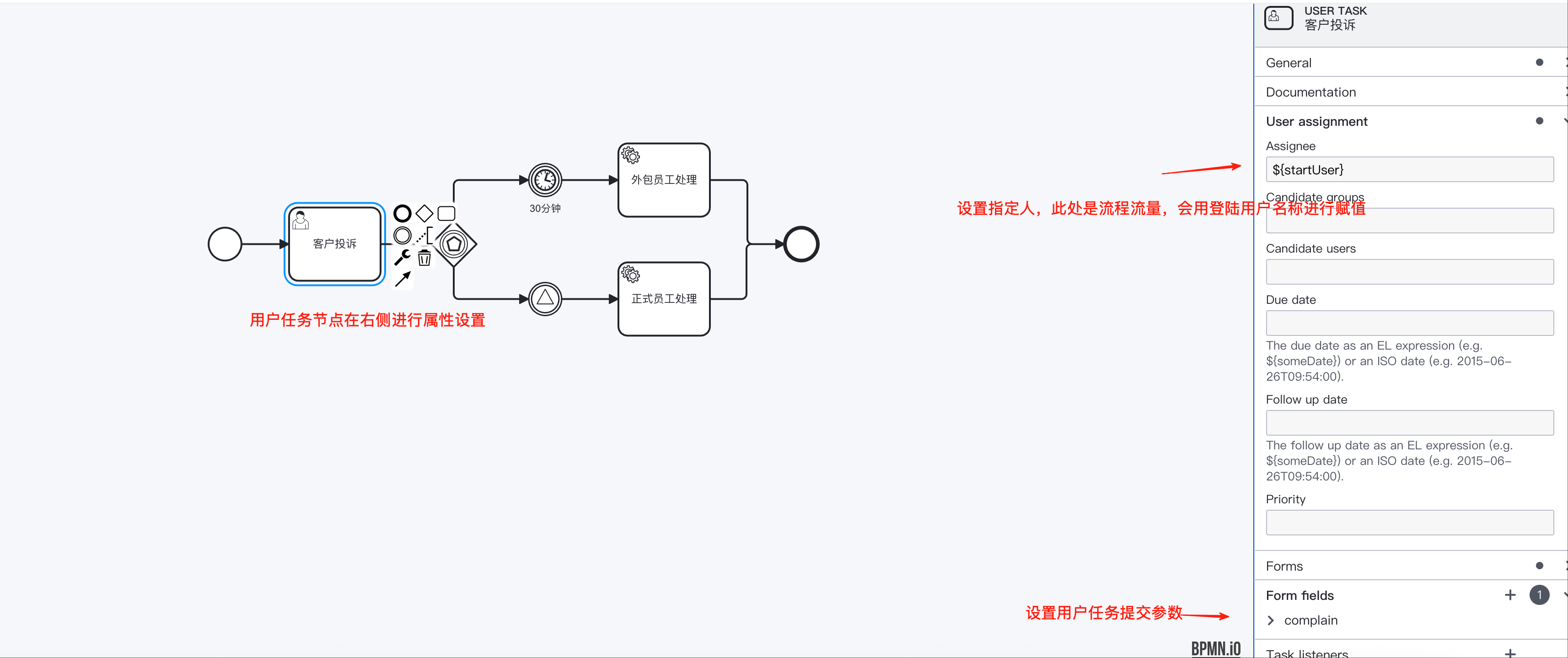
1. 客户投诉,用户任务节点设置 主要设置这个用户任务节点的指定人assignee和表单数据
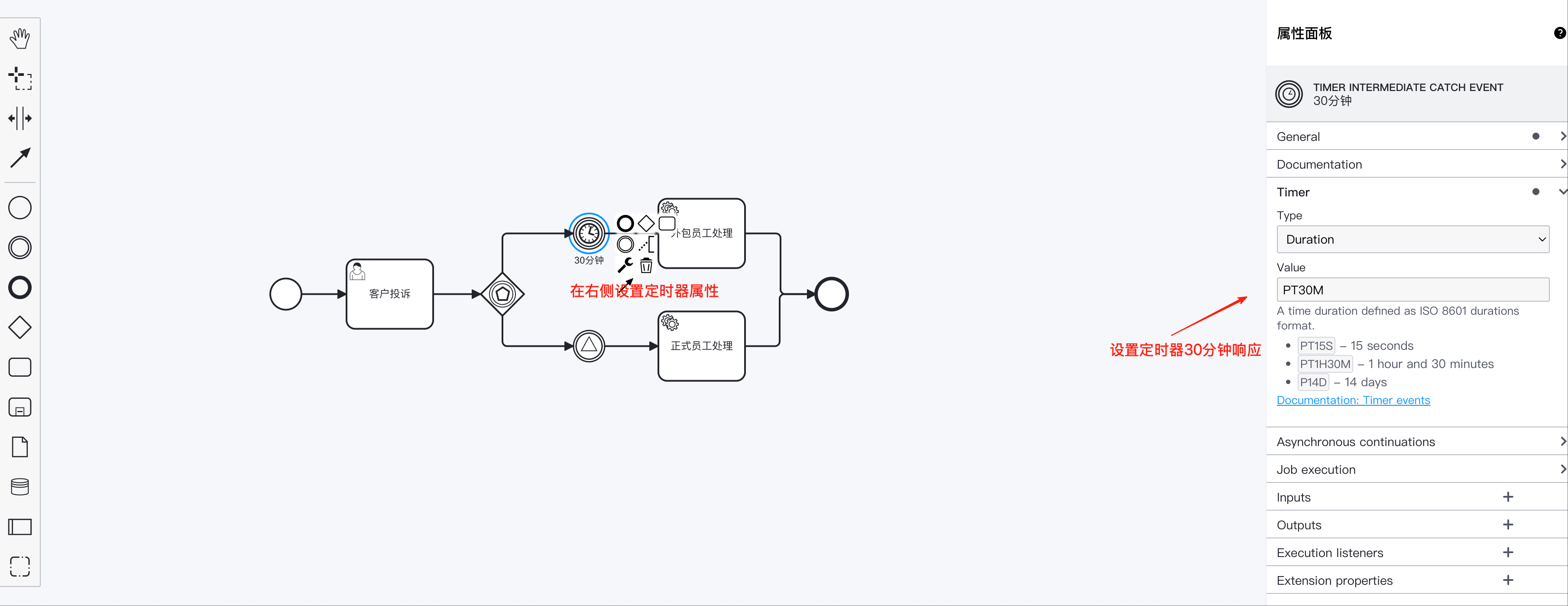
2. 定时器设置
设置定时器的延迟时间,也就是30分钟后。
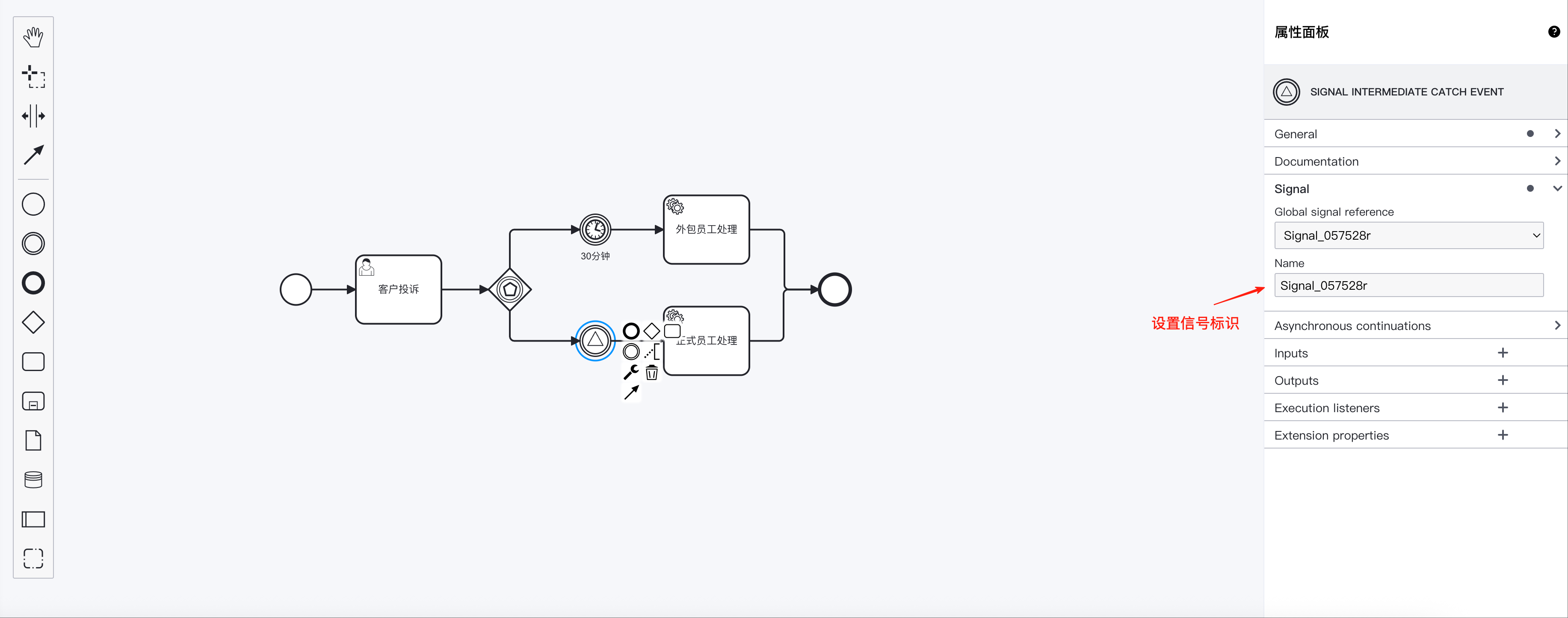
3. 信号事件设置
设置信号事件的值
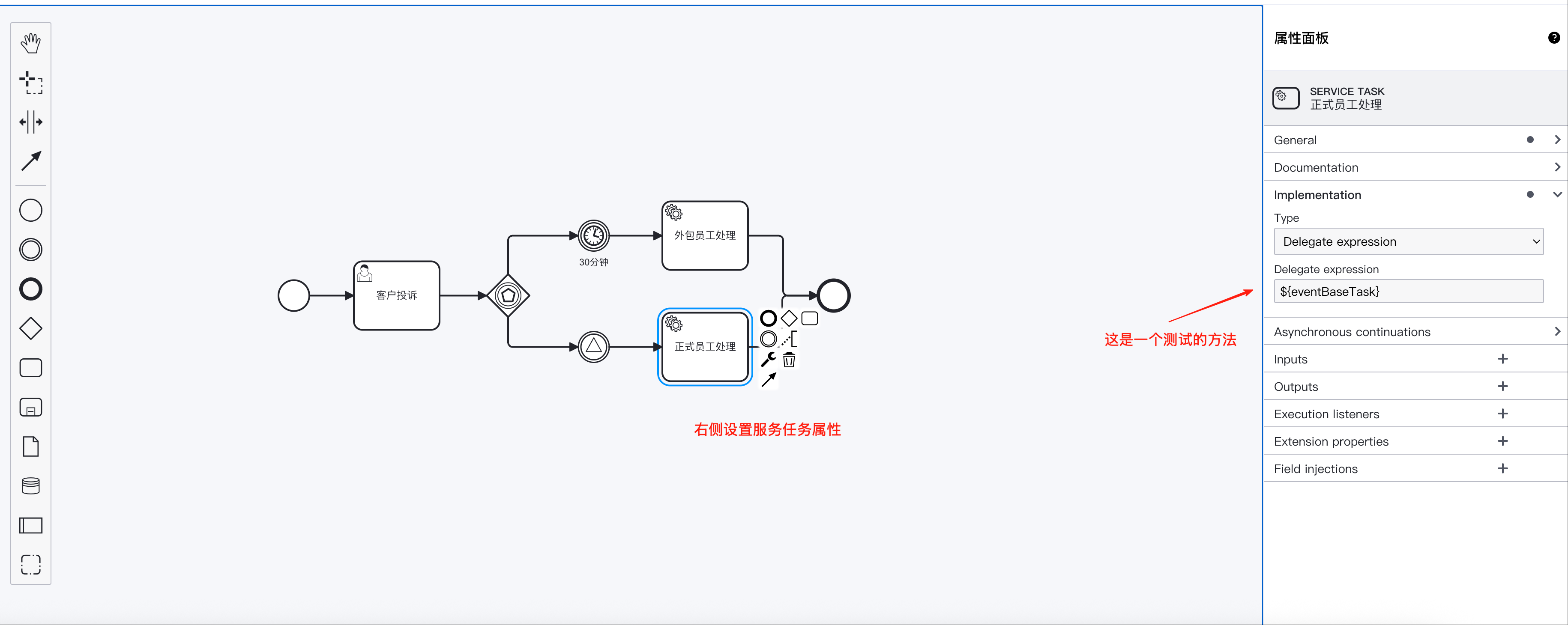
4. 服务任务设置
这里外包员工和正式员工都用了服务任务,也是一样的设置。 如下图所示。
5. 完整的BPMN设计文件
<?xml version="1.0" encoding="UTF-8"?>
<bpmn:definitions xmlns:xsi="http://www.w3.org/2001/XMLSchema-instance" xmlns:bpmn="http://www.omg.org/spec/BPMN/20100524/MODEL" xmlns:bpmndi="http://www.omg.org/spec/BPMN/20100524/DI" xmlns:dc="http://www.omg.org/spec/DD/20100524/DC" xmlns:camunda="http://camunda.org/schema/1.0/bpmn" xmlns:di="http://www.omg.org/spec/DD/20100524/DI" id="Definitions_1" targetNamespace="http://bpmn.io/schema/bpmn">
  <bpmn:process id="Process_5938" name="事件网关" isExecutable="true">
    <bpmn:startEvent id="Event_1n895r1">
      <bpmn:outgoing>Flow_08lr00y</bpmn:outgoing>
    </bpmn:startEvent>
    <bpmn:sequenceFlow id="Flow_08lr00y" sourceRef="Event_1n895r1" targetRef="Activity_1o9yj7s" />
    <bpmn:userTask id="Activity_1o9yj7s" name="客户投诉" camunda:assignee="${startUser}">
      <bpmn:extensionElements>
        <camunda:formData>
          <camunda:formField id="complain" label="投诉内容" type="string" />
        </camunda:formData>
      </bpmn:extensionElements>
      <bpmn:incoming>Flow_08lr00y</bpmn:incoming>
      <bpmn:outgoing>Flow_1btufj9</bpmn:outgoing>
    </bpmn:userTask>
    <bpmn:sequenceFlow id="Flow_1btufj9" sourceRef="Activity_1o9yj7s" targetRef="Gateway_1wieqzr" />
    <bpmn:eventBasedGateway id="Gateway_1wieqzr">
      <bpmn:incoming>Flow_1btufj9</bpmn:incoming>
      <bpmn:outgoing>Flow_0lxp7ae</bpmn:outgoing>
      <bpmn:outgoing>Flow_123wyin</bpmn:outgoing>
    </bpmn:eventBasedGateway>
    <bpmn:intermediateCatchEvent id="Event_1vg9fk3" name="30分钟">
      <bpmn:incoming>Flow_0lxp7ae</bpmn:incoming>
      <bpmn:outgoing>Flow_1gz0j8j</bpmn:outgoing>
      <bpmn:timerEventDefinition id="TimerEventDefinition_1i5i817">
        <bpmn:timeDuration xsi:type="bpmn:tFormalExpression">PT30M</bpmn:timeDuration>
      </bpmn:timerEventDefinition>
    </bpmn:intermediateCatchEvent>
    <bpmn:sequenceFlow id="Flow_0lxp7ae" sourceRef="Gateway_1wieqzr" targetRef="Event_1vg9fk3" />
    <bpmn:sequenceFlow id="Flow_1gz0j8j" sourceRef="Event_1vg9fk3" targetRef="Activity_15p7ged" />
    <bpmn:serviceTask id="Activity_15p7ged" name="外包员工处理" camunda:delegateExpression="${eventBaseTask}">
      <bpmn:incoming>Flow_1gz0j8j</bpmn:incoming>
      <bpmn:outgoing>Flow_048gexd</bpmn:outgoing>
    </bpmn:serviceTask>
    <bpmn:endEvent id="Event_0elive2">
      <bpmn:incoming>Flow_048gexd</bpmn:incoming>
      <bpmn:incoming>Flow_0sxb3o0</bpmn:incoming>
    </bpmn:endEvent>
    <bpmn:sequenceFlow id="Flow_048gexd" sourceRef="Activity_15p7ged" targetRef="Event_0elive2" />
    <bpmn:intermediateCatchEvent id="Event_1seapep">
      <bpmn:incoming>Flow_123wyin</bpmn:incoming>
      <bpmn:outgoing>Flow_084a4gw</bpmn:outgoing>
      <bpmn:signalEventDefinition id="SignalEventDefinition_120nm52" signalRef="Signal_057528r" />
    </bpmn:intermediateCatchEvent>
    <bpmn:sequenceFlow id="Flow_123wyin" sourceRef="Gateway_1wieqzr" targetRef="Event_1seapep" />
    <bpmn:sequenceFlow id="Flow_084a4gw" sourceRef="Event_1seapep" targetRef="Activity_0n4ew9x" />
    <bpmn:serviceTask id="Activity_0n4ew9x" name="正式员工处理" camunda:delegateExpression="${eventBaseTask}">
      <bpmn:incoming>Flow_084a4gw</bpmn:incoming>
      <bpmn:outgoing>Flow_0sxb3o0</bpmn:outgoing>
    </bpmn:serviceTask>
    <bpmn:sequenceFlow id="Flow_0sxb3o0" sourceRef="Activity_0n4ew9x" targetRef="Event_0elive2" />
  </bpmn:process>
  <bpmn:signal id="Signal_057528r" name="Signal_057528r" />

</bpmn:definitions>
# 代码讲解
public class GatewayController {

    @Autowired
    private IdentityService identityService;

    @Autowired
    private RuntimeService runtimeService;

    @Autowired
    private RepositoryService repositoryService;

    @Autowired
    private ProcessService processService;

    @Autowired
    private TaskService taskService;

    @ApiOperation(value = "触发信号", notes = "主要用于事件网关信号出发,推动流程往正式员工处理节点流转")
    @GetMapping("/triggerSignal")
    public R<?> triggerSignal(String processInstanceId) {
        log.info("processInstanceId:{}", processInstanceId);
        //查询执行实例
        List<Execution> executionList = runtimeService.createExecutionQuery().processInstanceId(processInstanceId).list();
        if (CollectionUtil.isEmpty(executionList)) {
            throw new ServiceException("流程已经结束");
        }
        //找到信号相关的执行实例id
        String executionId = executionList.get(1).getId();
        runtimeService.signalEventReceived("Signal_057528r", executionId);
        return R.ok();
    }

    @PostMapping("/startEventBase")
    @ApiOperation(value = "发起事件网关案例", notes = "发起事件网关案例")
    public R<?> startEventBase(@Validated @RequestBody EventBaseReq eventBaseReq) {
        log.info("startEventBase:{}", eventBaseReq);
        LoginUser loginUser = SecurityUtils.getLoginUser();
        try {
            // 启动流程前先检查流程定义是否存在
            ProcessDefinition processDefinition = checkProcessDefinition(eventBaseReq.getModelKey());
            if (processDefinition == null) {
                return R.fail("流程定义不存在,请检查流程Key: " + eventBaseReq.getModelKey());
            }
            //启动流程&&并设置启动人
            identityService.setAuthenticatedUserId(Optional.ofNullable(loginUser).map(LoginUser::getUsername).orElse("admin"));

            //设置用户任务流程变量的值
            Map<String, Object> variables = new HashMap<>(4);
            variables.put("startUser", loginUser.getUsername());
            ProcessInstance processInstance = runtimeService.startProcessInstanceByKey(eventBaseReq.getModelKey(), variables);
            log.info("流程实例启动成功: {}", processInstance.getId());

            //提交第一个用户任务
            Task task = taskService.createTaskQuery().processInstanceId(processInstance.getProcessInstanceId()).taskAssignee(loginUser.getUsername()).singleResult();
            if (task != null) {
                Map<String, Object> params = new HashMap<>(12);
                params.put("complain", eventBaseReq.getComplain());
                taskService.complete(task.getId(), params);
            }
            return R.ok("流程启动成功,实例ID: " + processInstance.getId());

        } catch (Exception e) {
            log.error("启动流程失败: {}", e.getMessage(), e);
            return R.fail("启动流程失败: " + e.getMessage());
        } finally {
            // 清理认证上下文,避免影响其他请求
            identityService.clearAuthentication();
        }
    }
}
# 演示页面
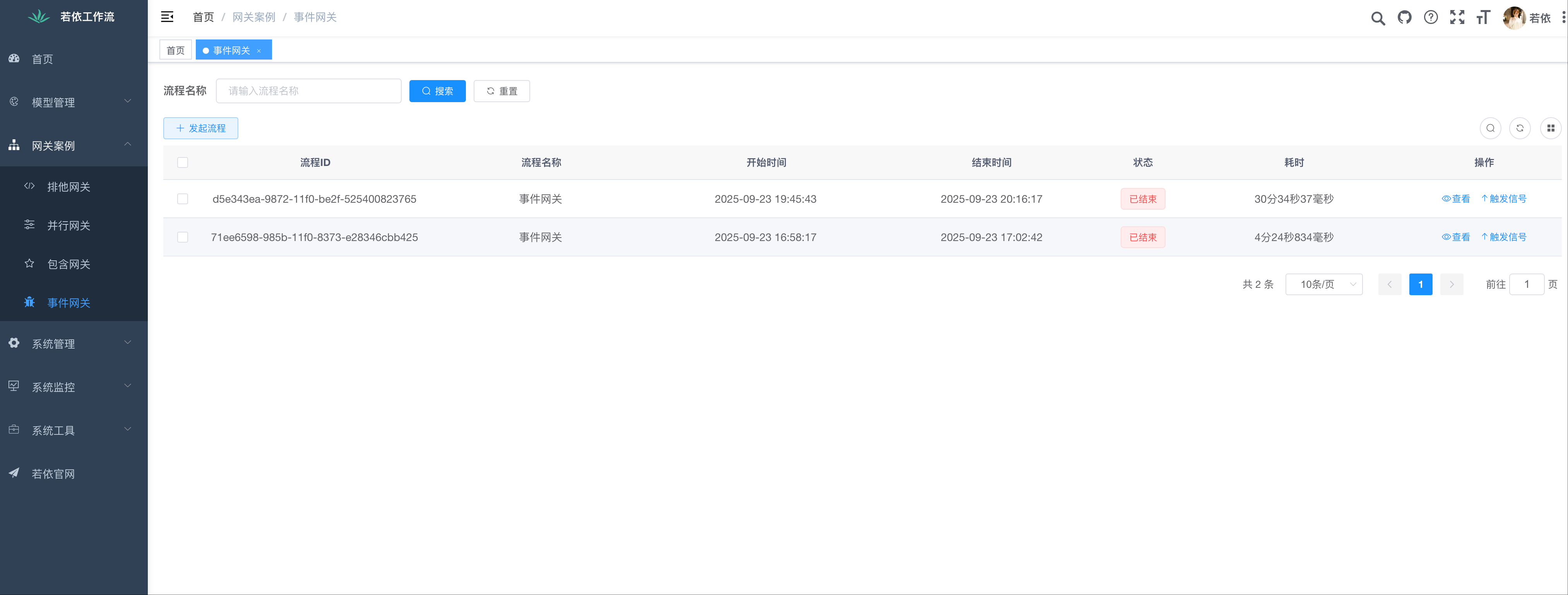
事件网关管理页面
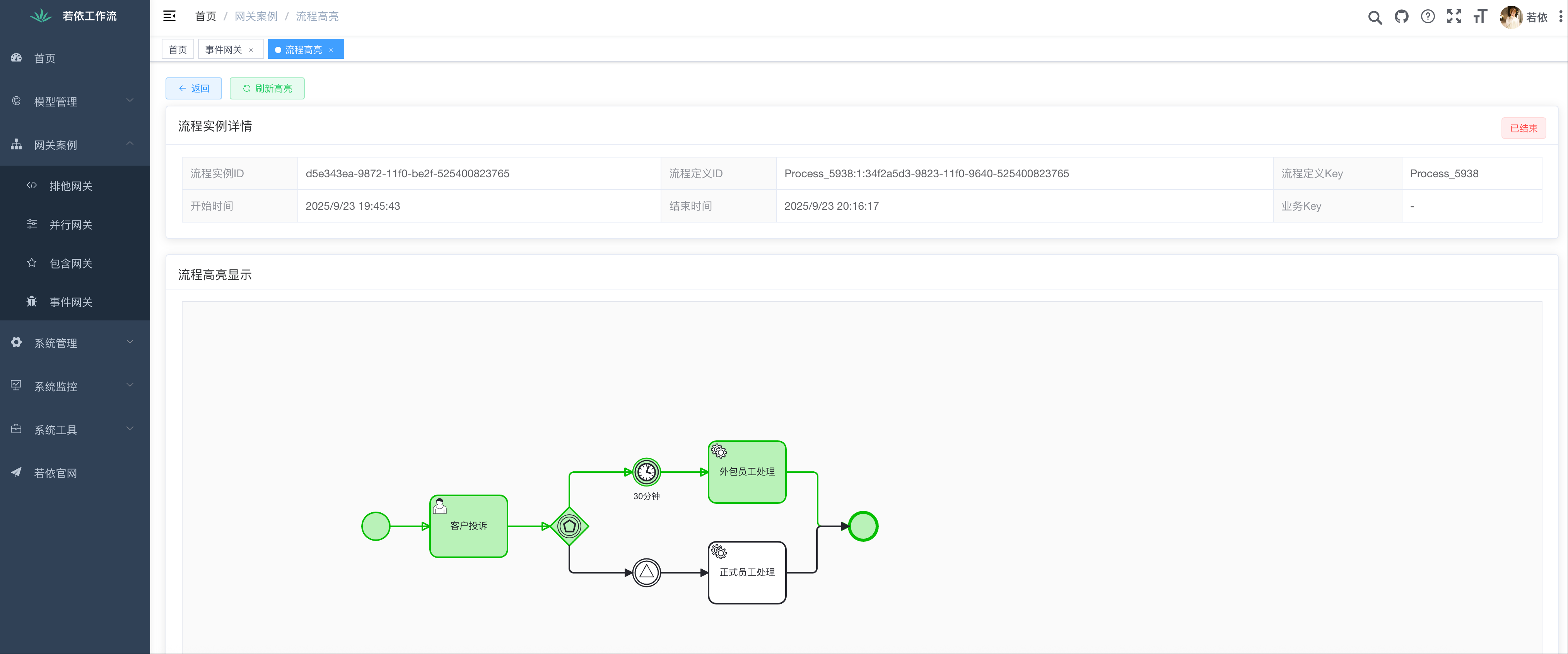
事件网关案例的高亮显示页面
以上是基于camunda7.18.0接口实现的流程发起和触发信号事件。 访问网站,在线体验RuoYiFlow
# 最佳实践
所有分支上的事件应该是互斥的,确保只会有一个事件被触发。
始终为定时器事件设置一个合理的超时路径,避免流程永远挂起。
明确事件的定义(如消息名称),确保触发时能准确匹配。
# 常见陷阱
- 误解并行事件网关: 牢记它和普通事件网关功能一样。
- 事件网关后连接任务: 这是语法错误,必须连接中间捕获事件。
- 忘记取消监听: 理论上,如果先触发的事件处理失败,其他事件仍处于监听状态,可能导致意外行为。需做好事务管理。
在线体验,请访问ruoyiflow (opens new window)